

In the reality of web projects, there are many reasons for wanting to test accessibility before a formal RGAA audit. Out of simple curiosity, to raise awareness of accessibility, because the budget has not yet been committed, or to check what has been delivered by a service provider before going any further. But how do you go about it?
This article proposes a series of simple tests, which can be carried out by a non-expert team, to identify signs of non-accessibility. These initial tests are not intended to measure regulatory compliance, but to identify obvious obstacles that have a direct impact on the user experience. They do not constitute an RGAA audit or an assessment of compliance, and under no circumstances can a site be declared accessible. Detecting accessibility problems upstream often makes it easier to understand what an RGAA audit will reveal, and to avoid late and costly corrections.
Why and how should accessibility tests be carried out before an RGAA audit?
The RGAA audit remains the only reference for assessing a website's compliance with accessibility standards in France. However, in many contexts, it is useful to be able to carry out a quick first look. These tests can meet concrete needs: detecting blocking problems before going live, prioritising corrections before a formal audit, or simply understanding the current state of a site. They are a pragmatic first step in the accessibility process.
Prior to an RGAA audit, these tests play an essential educational role: they make visible difficulties that are often invisible to the teams designing or managing the site.
1 - Testing keyboard navigation
The first test consists of navigating the site without using the mouse, using only the keyboard. In practical terms, this means using the Tab and Shift+Tab keys to move between interactive elements, Enter to activate links and buttons, and Esc to close modal windows or drop-down menus.
This test can quickly reveal several types of problem: interactive elements that are completely inaccessible using the keyboard, an incoherent navigation order that does not follow the visual logic of the page, menus or modals that are impossible to close without a mouse, or buttons and links that remain invisible when the focus is on them. If a key action cannot be performed using the keyboard, the site is not accessible to a significant proportion of users.
2 - Check the visibility of the focus
The keyboard focus must be clearly visible on all interactive elements. An invisible or barely perceptible focus prevents users from finding their way around the interface and makes navigation particularly difficult. The visibility of the focus is one of the points most often not complied with during RGAA audits, because many sites deliberately suppress this indicator for aesthetic reasons, without measuring the impact on accessibility.
To check this, simply navigate the keyboard and observe carefully whether the focus is still identifiable. This test can be used to detect very common problems: a focus that has been completely removed by CSS, a focus that is too discreet and blends in with the design, or a focus that is masked by an animation or overlay.
3 - Testing the zoom at 200%
This test consists of use the browser's zoom function to display the page at 200 % of its original size, without changing the font size in the system settings. This manipulation highlights a number of common problems: text that is truncated or blocks that overlap, menus that become unusable, forms whose layout breaks, or buttons that pop off the screen. When content overlaps, disappears or becomes unusable when zoomed in, this often reveals a design that is not robust enough to meet users' real needs.
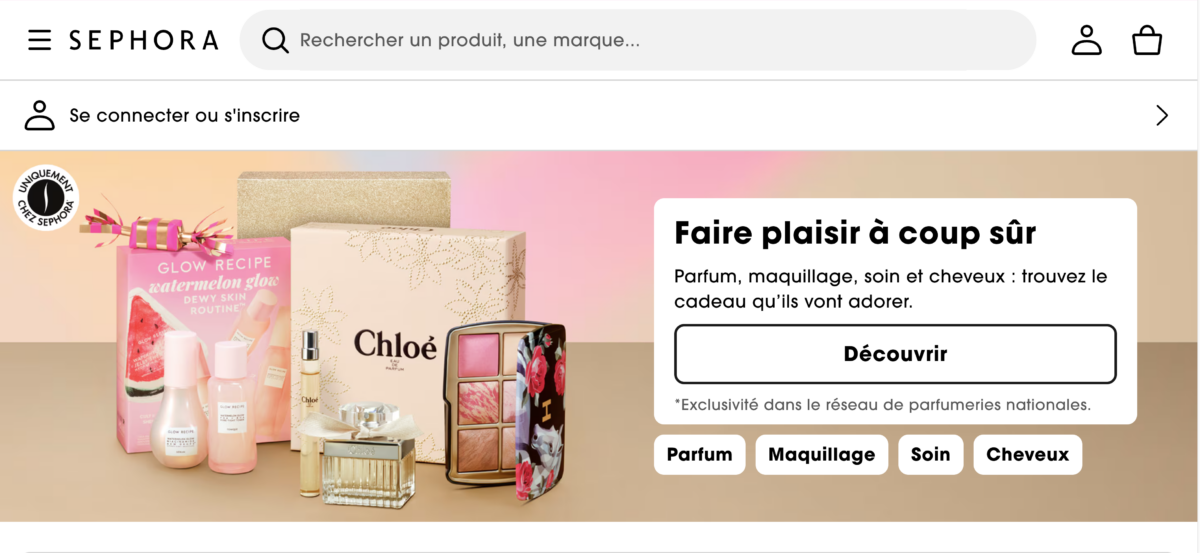
The Sephora site zoomed in at 200% as in the example shows no major problems with the text on the homepage. Observation made in December 2025.
4 - Checking the structure of titles
A poor hierarchy of headings makes it difficult to understand the content, particularly for screen reader users who often navigate by headings or list of links. To assess content structure, you need to browse the page only via headings and links, without reading the text in its entirety.
This approach allows us to ask a number of essential questions: do the headings really describe the content of each section? Is the hierarchy of headings logical and does it follow a coherent progression? Do the link headings make sense when read out of context?
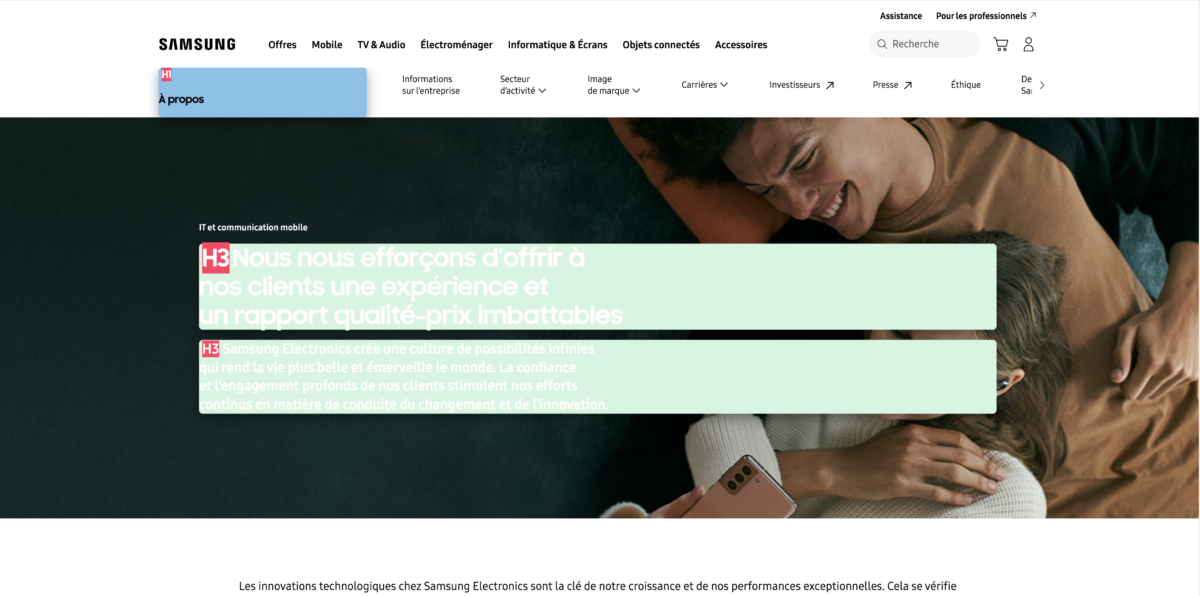
The Samsung site has consistent content on some pages and inconsistencies on others. On the IT and mobile communication page, for example, two h3s follow on from each other (highlighted on the screenshot by the Heading Tag markup extension). Observation made in December 2025.
5 - Testing forms
Forms account for a large proportion of RGAA non-compliance. To test them, simply submit a form with deliberate errors. A number of things need to be checked: do the error messages clearly explain the problem and how to correct it? Is the field in error easily identifiable visually? Is the focus correctly repositioned on the first field in error after submission? An inaccessible form simply prevents the user from taking action, even when the information is understandable.
6 - Check the text alternatives for images
Without a textual alternative, visual information becomes totally inaccessible to some users. A simple approach to testing image processing consists of read the page without taking the images into account, wondering whether the information is still understandable. Are certain images essential to understanding the content? If so, is their textual alternative present and sufficient?
See also «Informative or decorative images: making the difference in digital accessibility (RGAA)»
7 - Testing the most obvious contrasts
Insufficient contrast is not simply a matter of visual comfort: it can prevent access to information. Without using a specialised tool, it is possible to spot obvious contrast problems: light text on a light background, text placed directly on an image without background treatment, or the use of a small font size combined with a thin typeface.
If the user carrying out the test has no particular eyesight problems and reading is uncomfortable under «normal» viewing conditions, it will be even more so for those who are visually impaired, colour blind or suffering from visual fatigue.
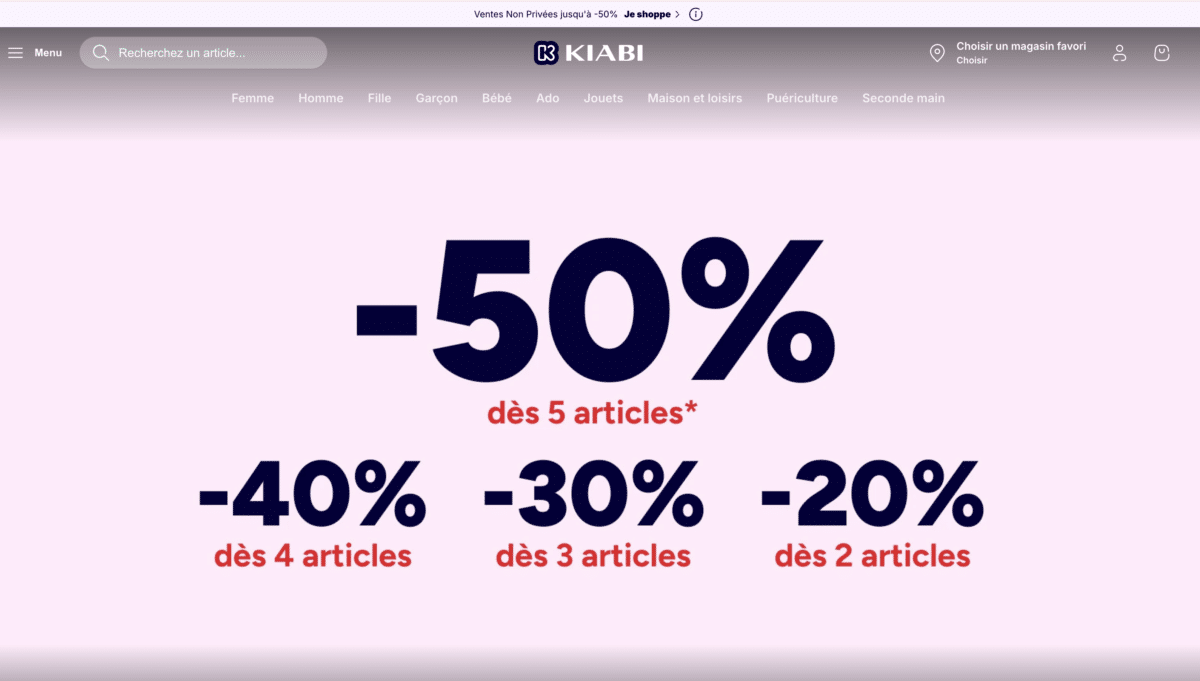
Reading the menu on the Kiabi website is uncomfortable (white text on a pale greyish pink): even without a specialised tool you can tell there is a lack of contrast. Observation made in December 2025.
These simple tests enable us to detect blocking problems quickly, prioritise corrections before a formal audit, avoid major errors in production and gain a better understanding of what a future RGAA report will reveal. An accessibility obstacle is not necessarily a technical bug: it is often the result of a design choice that has not taken into account the diversity of uses. These tests are a first layer of evaluation accessible to all members of a project team.
However, they cannot be used to certify compliance with the RGAA, to cover all accessibility criteria, or to replace a formal audit carried out by experts. They provide only a partial, albeit useful, indication of a site's accessibility status.